

I wanted to build a smart chatbot for my Give You A Home Construction Ltd. company’s website to provide quick, helpful responses to customer questions and improve user experience. This AI Chatbot by AWS Bedrock is a scalable, intelligent conversational agent powered by AWS’s cutting-edge foundation models. Built with serverless AWS services, it provides seamless, context-aware customer interaction.
1. Architecture Overview
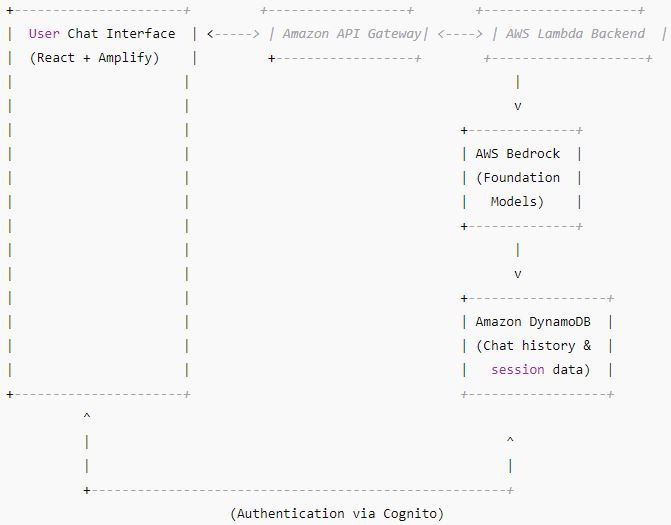
2. Setup Overview
Step A: Setup User Authentication with Amazon Cognito
- Create a Cognito User Pool for users to register and login.
- Enable user sign-up/sign-in.
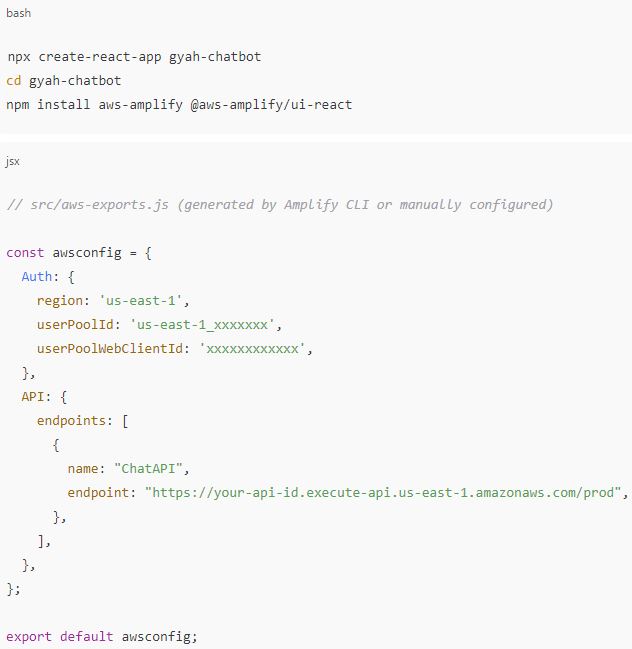
- Integrate Cognito with frontend React app (via AWS Amplify Auth module).
Step B: Frontend Chat UI with React + AWS Amplify Hosting
- React app with chat interface.
- Use Amplify to host static site and integrate Cognito auth.
- Frontend calls API Gateway endpoints.
Step C: Backend API with API Gateway + AWS Lambda
- API Gateway exposes REST endpoints (e.g.,
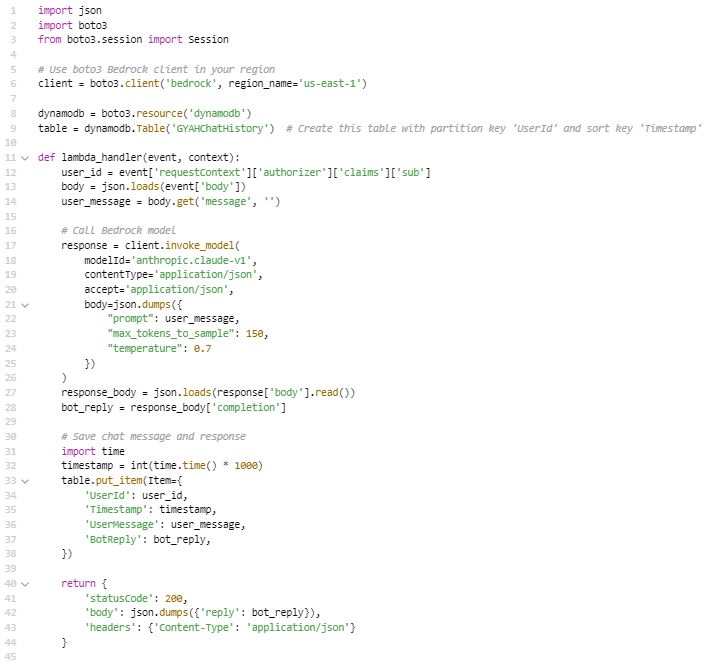
/chat). - Lambda functions handle requests, call AWS Bedrock, store chat history in DynamoDB.
Step D: Use AWS Bedrock for AI Responses
- In Lambda, call Bedrock foundation models (e.g., Anthropic Claude) to get chatbot reply.
Step E: Persist Data in DynamoDB
- Store chat sessions and conversation logs per user.
- Helps for context or analytics later.
Step F: Monitor with CloudWatch
- Log Lambda invocations, errors, and set alarms if needed.
3. Detailed Implementation Steps
Step A: Cognito Setup
- Go to AWS Cognito console → Create a User Pool
- Configure sign-in options (email, username)
- Set password policies and verification settings
- Create an App Client without a secret (for web app)
- Note the User Pool ID and App Client ID
Step B: React Frontend

Step C: AWS Lambda Backend (Python )
Step D: DynamoDB Table Setup
- Create a DynamoDB table named
GYAHChatHistory - Partition Key:
UserId(String) - Sort Key:
Timestamp(Number)
Step E: API Gateway
- Create a REST API
- Create
/chatPOST method linked to Lambda function - Enable Cognito User Pool authorizer to secure API
- Deploy the API and get the invoke URL for your frontend
Step F: Monitoring and Logging
- Use CloudWatch Logs for Lambda
- Set alarms for errors or throttling
- Optionally enable X-Ray for tracing
4. Summary
| Component | AWS Service | Purpose |
|---|---|---|
| Authentication | Amazon Cognito | User sign-up/sign-in |
| Frontend Hosting | AWS Amplify | React app hosting |
| Backend API | API Gateway + Lambda | Chat API and calls to Bedrock |
| AI Model | AWS Bedrock | Foundation model for chatbot |
| Data Storage | DynamoDB | Store chat sessions and logs |
| Monitoring | CloudWatch | Logs and alarms |
5. Next Steps & Recommendations
- Use Amplify CLI to speed up Cognito, API Gateway, Lambda, and hosting setup
- Add multi-turn conversation context by storing past messages in DynamoDB and feeding them to Bedrock prompt
- Implement proper error handling and retries
- Add front-end polishing and user experience improvements
This project demonstrates how to leverage AWS Bedrock and related AWS services to build a powerful, efficient, and easy-to-maintain AI chatbot. It can be customized and extended to fit various business needs, helping companies deliver exceptional customer service with the latest AI technology.
Created By Yao Zhang Using Midjourney And ChatGPT

 Yao Zhang's Labs