

🚶 Step-by-Step New Employee Onboarding Setup:
Step 1: Create IAM User
- Go to IAM > Users > Add users
- Enter the username (e.g.,
jdoe) - Select Access type:
- ✔️ AWS Management Console access (with password)
- ✔️ Programmatic access (for CLI/API use)
✅ Optional: Autogenerate password & require password reset
Step 2: Add User to a Group
- Create a group if it doesn’t exist (e.g.,
Developers,HR, orCloudEngineers) - Attach policies (e.g.,
AmazonS3ReadOnlyAccess, custom policies) - Add the user to this group
Step 3: Create and Attach IAM Role (Optional)
- If the user needs temporary elevated permissions:
- Go to IAM > Roles > Create role
- Use “IAM user” as trusted entity
- Assign permissions (e.g., admin or project-specific)
- Tag the role for tracking (e.g.,
Project: Onboarding) - Grant the user permission to assume this role via policy: jsonCopyEdit
{ "Effect": "Allow", "Action": "sts:AssumeRole", "Resource": "arn:aws:iam::123456789012:role/OnboardingRole" }
Step 4: Add Tags to the IAM User
- Add tags such as:
Department=EngineeringManager=AliceStartDate=2025-06-11EmployeeID=00125
Tags help with cost tracking, permissions, and automation.
Step 5: Send a Welcome Email
Use Amazon SES or an external integration (like AWS Lambda + SNS or Zapier):
Option A: AWS SES + Lambda
- Verify sender email in Amazon SES
- Create a Lambda function (Python/Node.js) that sends an email using
boto3 - Trigger Lambda manually or through an EventBridge Rule
pythonCopyEditimport boto3

ses = boto3.client('ses', region_name='us-west-2')

def lambda_handler(event, context):
    ses.send_email(
        Source='hr@yourcompany.com',
        Destination={'ToAddresses': ['jdoe@yourcompany.com']},
        Message={
            'Subject': {'Data': 'Welcome to AWS Team!'},
            'Body': {
                'Text': {
                    'Data': 'Hi John, your IAM login is ready. Visit https://console.aws.amazon.com'
                }
            }
        }
    )
🚀 Automation Suggestion (Advanced)
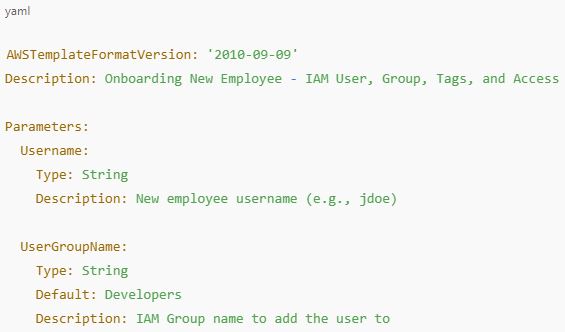
Use CloudFormation YAML template to automate the onboarding process for a new employee:
✅ What it does:
- Creates an IAM User
- Adds the user to a specified group
- Tags the user
- (Optional) Attaches a policy directly
- Sets a login password
- Stores the credentials in AWS Secrets Manager for secure retrieval
📄 CloudFormation Template (YAML)
Or to use the Step Functions workflow that runs everything together, but that will be more advanced setup.
Created By Yao Zhang Using Midjourney And ChatGPT

 Yao Zhang's Labs